

The dates are in there. Somewhere.
School sends a lot of email. ParentSquare digests, ClassDojo updates, Remind texts, the PTA newsletter, the district calendar change. The dates you actually need — picture day, the early-dismissal Wednesday, the field-trip permission deadline — are buried in the middle, and they reach one parent's inbox, not the family.
Retyping them into a calendar is the chore everyone skips. Gezin does the retyping. Every family has its own inbox address; forward the school email there and Gezin AI reads it, suggests one event per date it finds, and waits for you to save it. Nothing lands on the calendar on its own.
From inbox to family calendar.
1. Find your family inbox address
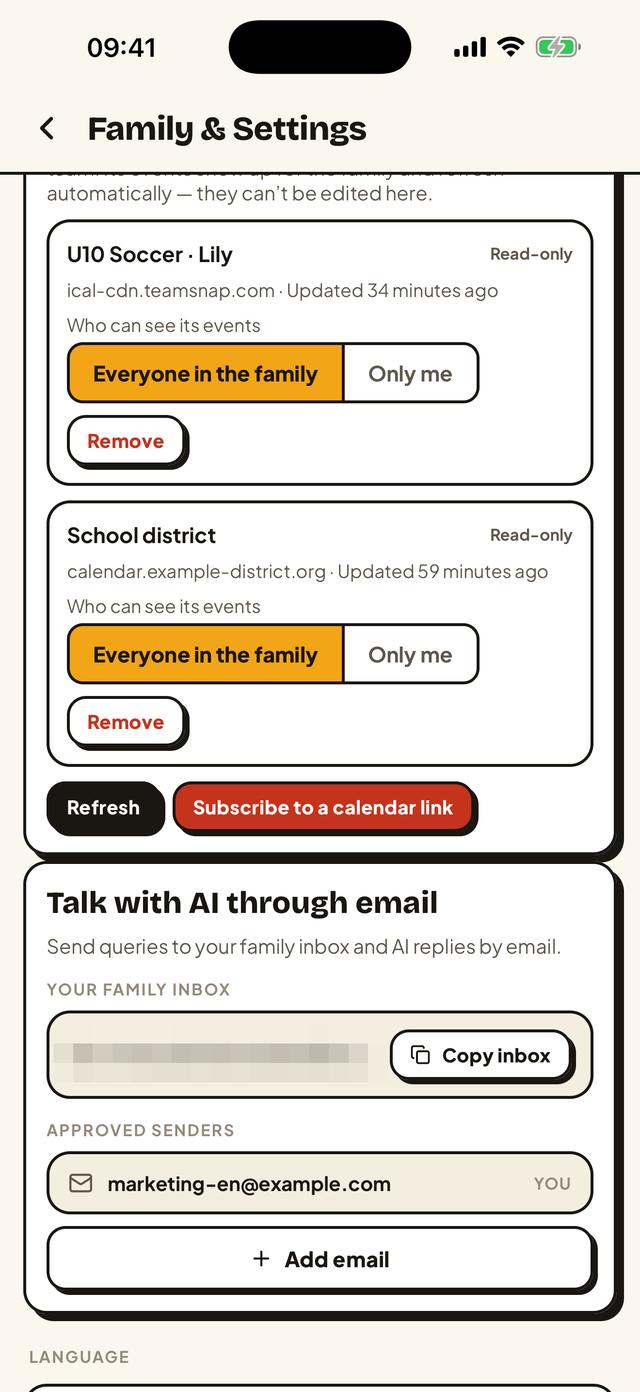
Open Family & Settings in Gezin (tap your initials at the top right) and find the card Talk with AI through email. Under Your family inbox is an address ending in @inbox.getgezin.com. Tap Copy inbox. Save it as a contact called "Family calendar" so it's one tap away in your mail app.
2. Forward the school email
Forward the ParentSquare digest, the ClassDojo message, the district newsletter — whatever has the dates — to that address. Send it from the email address you use to sign in to Gezin. Mail from any other sender is ignored; to let a grandparent or the other parent's second address forward too, add it under Approved senders on the same card.
3. Review the suggestions
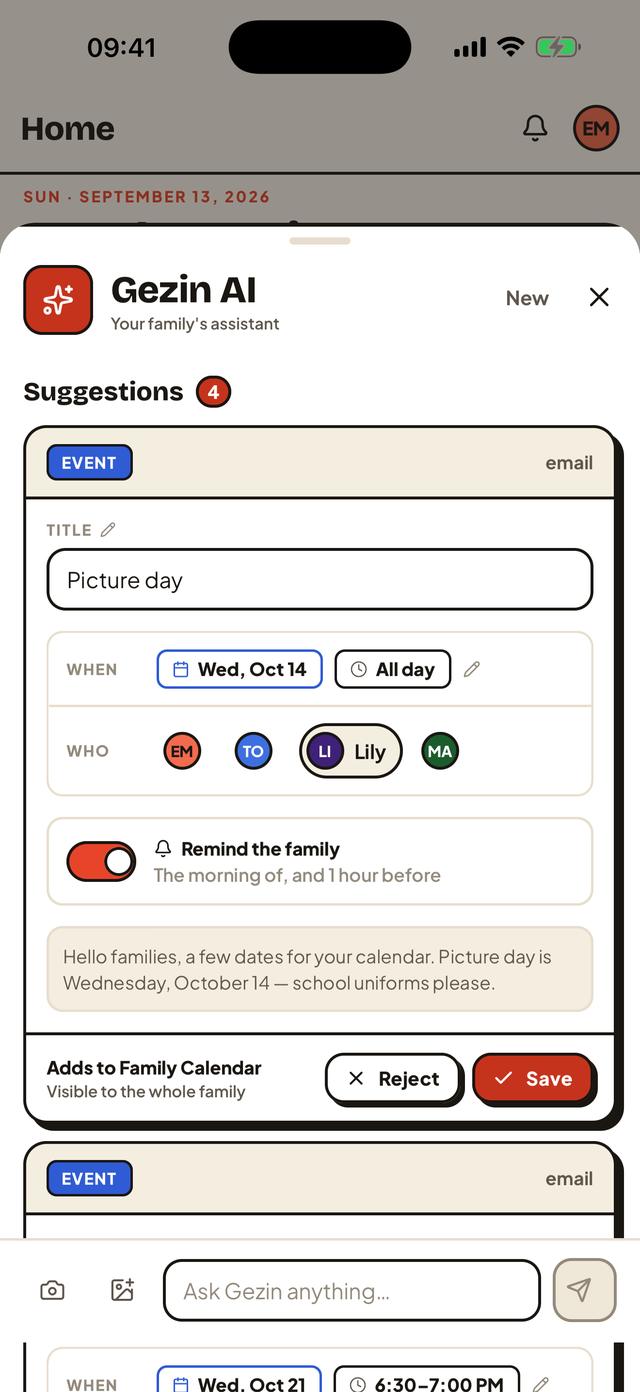
Open Gezin AI in the app. Each date from the email shows up under Suggestions, labelled email and quoting the line it came from: "Picture day — Wednesday, October 14, all day", "Early dismissal, 12:30 — Wednesday, October 21", "PTA night — Thursday, October 22, 6:30 pm". Fix a date or time if the email was vague, pick which kid it's for, and decide whether the family gets a reminder.
4. Save
Tap Save on each one you want. It lands on the family calendar, visible to everyone in the family. Reject the rest. A newsletter with four dates becomes four suggestions and, thirty seconds later, the events the other parent has been asking about.
No email to forward? Pasting works too: copy the text of a ParentSquare post or a Remind message into the Gezin AI box and you get the same suggestions.
Where the school publishes a calendar feed, subscribe to it too.
Forwarding is for the dates that only exist in messages. Many schools and districts also publish a calendar you can subscribe to; subscribe once in Gezin and it stays in sync by itself. Combine the two and the family calendar has everything.
ParentSquare
ParentSquare lets parents subscribe to a calendar that combines all their groups, classes and grades. On the ParentSquare website, open Calendar (under Explore in the left menu) and click Subscribe at the top right. The dialog offers a subscription link — copy it (if it appears as a button, right-click and copy the link address) — and paste it into Gezin under Family & Settings → Connections → Subscribed calendars → Subscribe to a calendar link, choosing Everyone in the family. The ParentSquare mobile app instead offers Automatically add events to the calendar, which writes to your phone's own calendar; if that calendar is a Google or iCloud calendar you've connected to Gezin, those events flow through as well.
ClassDojo
ClassDojo's calendar sync is built for teachers and staff; for families it is part of ClassDojo Plus, a paid add-on. Without it there is no calendar link to subscribe to — so for ClassDojo, forwarding the email (or pasting the class story post) is the way.
School and district websites
Most district sites have a Calendar page with a Subscribe, iCal or Google Calendar option. Copy the link (not a downloaded .ics file, which is a one-time snapshot) and subscribe the same way. Days off, early-release days and breaks then arrive without an email at all.
Third-party details checked on September 13, 2026. ParentSquare's steps are as described in district help pages (for example Irvine USD and Stillwater CSD); ParentSquare's own help center wasn't reachable at the time, so confirm the button names in your account. ClassDojo's family-sync limitation is from its help article "Turn on ClassDojo Calendar Syncing" and the ClassDojo Plus FAQ. If something has changed, let us know. ParentSquare, ClassDojo and Remind are trademarks of their owners; Gezin is not affiliated with any of them.
What happens to the email you forward.
The forwarded email is processed by an AI model to pull out the dates and details, and the suggestions are shown to your family. Nobody at Gezin reads your mail. From our privacy policy, word for word:
- "If you choose to share a photo, a link, a forwarded email, or text for the AI assistant to turn into events, tasks, meals, or lists, we process that content to generate suggestions. You decide what to submit and you review suggestions before anything is saved."
- "We send only the content needed for the request. AI suggestions can be inaccurate or incomplete, and you review and approve them before anything is saved. We do not use your submitted content for advertising."
The policy names the AI providers involved and how to withdraw consent; the forwarded-email feature is one of the optional features it describes. Your family inbox only accepts mail from your family's own addresses and the senders you approve.
The calendar both parents look at.
One inbox, whole family
Whoever gets the school email forwards it. The approved event shows up for both parents, the grandparents and anyone else in the family — on Android, iPhone or the web.
A nudge before picture day
Turn on "Remind the family" when saving a suggestion — the morning of, and an hour before — so early dismissal doesn't surprise anyone.
Tasks and lists too
"Bring a white T-shirt for tie-dye day" becomes a task; the bake-sale ingredient list lands on the shopping list. Same forward, same approval step.
Questions, answered.
Is my school email read by a person?
No. The email you forward is processed by an AI model to pull out dates and details; nobody at Gezin reads it. As our privacy policy puts it: you decide what to submit and you review suggestions before anything is saved. We send only the content needed for the request and we do not use your submitted content for advertising.
Which languages does it understand?
The email can be in any language. The suggestions come back in the language your Gezin app is set to: English, Dutch or Turkish.
Does it work with Gmail auto-forwarding?
Not yet. Gmail only turns on automatic forwarding after a confirmation code is sent to the forwarding address, and your family inbox can't show you that code today. Forward school emails by hand for now; it is two taps, and it keeps you in control of what the family calendar receives.
Can anyone send events to my family calendar?
No. Your family inbox only accepts mail from the email addresses of your family members' Gezin accounts, plus any addresses you add under Approved senders. Anything else is ignored. And nothing reaches the calendar without someone in the family approving it.
Does ParentSquare or ClassDojo have a calendar feed I can subscribe to instead?
ParentSquare: often, yes. On the ParentSquare website, open Calendar and use the Subscribe button to get a calendar link, then subscribe to it in Gezin under Subscribed calendars. ClassDojo: calendar sync for families is part of ClassDojo Plus, a paid add-on, so forwarding the ClassDojo email is the way for most families.
Read next
- Every TeamSnap practice and game on the family calendar — subscribe once, refreshed hourly.
- Everything Gezin does — calendar, tasks, meals, recipes and shopping for the whole household.
- Privacy policy — including the AI processing section.
- Who makes Gezin — and where to get the app.